- - - - - - - - - - - - - - - - - - - - - - - - - - - - - - - - - - - - - - - - - - - - - - - - - - - TLTRBLBR - - - - - - - - - - - - - - - -
In the above test case an inline element (span with gray background) has position:relative and contains four absolutely positioned spans, so (according to the specification) it is the ancestor that establishes the containing block for them. The four absolute elements are positioned at the four "corners": top-left, top-right, bottom-right, bottom-left.
Just for visualization help the containing paragraph has a big font-size and the four absolute elements have colored borders on those sides where they should be "attached" to the c.b. edges (e.g. the one with left:0, top:0 has left and top colored borders).
If the browser window is resized the inline relative element wraps differently and is possible to check where the browsers position the four absolute elements.
The specification says the following about this case, see CSS 2.1 definition of "containing block" (assuming that 'direction' is 'ltr') :
… the top and left of the containing block are the top and left padding edges of the first box generated by the ancestor, and the bottom and right are the bottom and right padding edges of the last box of the ancestor …
Note: This may cause the containing block's width to be negative.
Support for the above is not very good, except for the left and top positioning where all browsers agree. About right and bottom positioning:
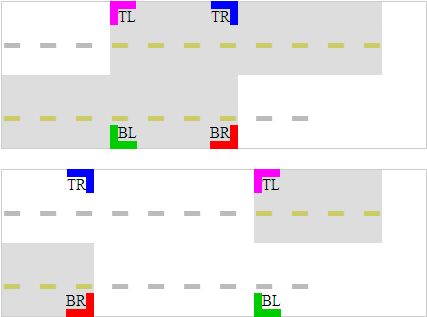
The below test cases show (using some br, so there is no need to resize the window) the two cases of a multiline relative box:
The second case should cause "the containing block's width to be negative". As mentioned above, IE7 is the only browser respecting this.
- - -
- - - - - - - -
- - - - - - -TLTRBLBR
- -
- - - - - - -
- - - -
- - -TLTRBLBR
- - - - - -
The desired rendering of the two above test cases is something like the following picture (at least according to my interpretation of the spec, especially for the case of "negative" width):
Related Gecko bugs: mozilla bug 5016, mozilla bug 489100.